 Andrey's Plugins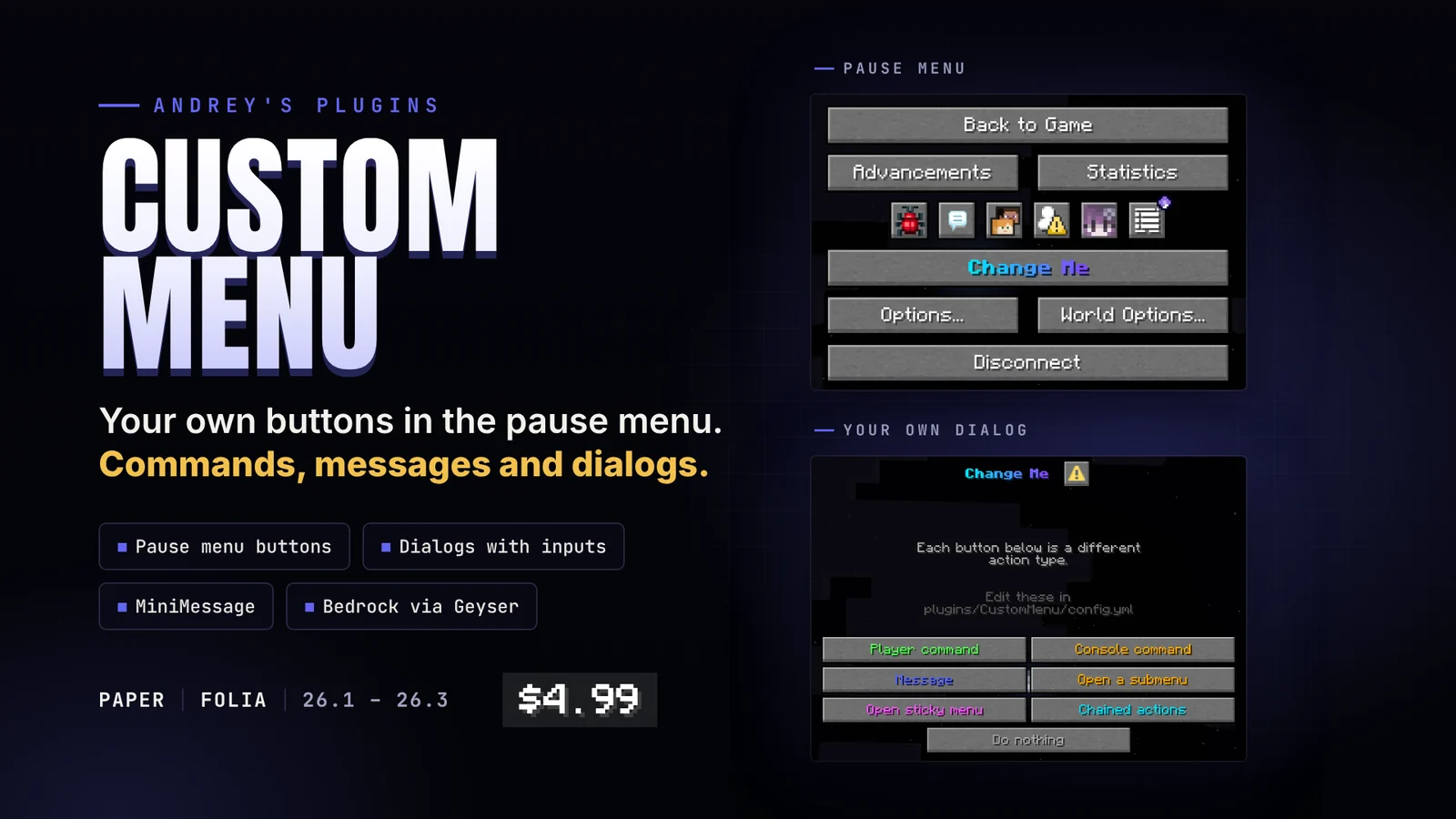
Custom Menu
Custom Menu allows you to add custom buttons and dialogs directly to Minecraft's vanilla pause menu.
Create server selectors, utility menus, confirmation dialogs, report forms, navigation menus, and more without replacing the familiar vanilla interface. Every button, dialog, and action is defined in a simple YAML configuration and can be customized to fit your server.
Designed to be lightweight, fully configurable, and production-ready.
Features
Native Pause Menu Integration
Extend Minecraft's pause menu with your own buttons while preserving the vanilla appearance and user experience.
Multiple Action Types
Buttons can perform a variety of actions, including:
- Execute player commands
- Execute console commands
- Send MiniMessage messages
- Open another menu
- Open dialogs
- Chain multiple actions together[/COLOR]
Interactive Dialogs
Create dialogs containing multiple input components and use the entered values in commands or messages.
Examples include:
- Reports
- Applications
- Feedback forms
- Confirmation dialogs
- Administrative tools[/COLOR]
Fully Configurable
Everything is configured through config.yml file
Configure button positions, titles, colors, layouts, actions, dialogs, input fields, and more without touching the source code.
MiniMessage Support
Supports Adventure MiniMessage formatting, including:
- RGB colors
- Gradients
- Decorations[/COLOR]
Lightweight
No unnecessary dependencies, databases, or complicated setup. Simply install the plugin, edit the configuration, and reload or restart.
Example Uses
- Server selector
- Discord button
- Store button
- Report player
- Rules menu
- Staff tools
- Confirmation dialogs
- Utility shortcuts
- Network navigation[/COLOR]
GeyserMC also translates this menu to bedrock edition.
Commands
Why Custom Menu?
Inventory GUI plugins work well for inventories—but sometimes you simply want to extend Minecraft's existing interface.
Custom Menu integrates directly into the vanilla pause menu, allowing players to access your server's features without opening custom inventories or learning a new UI. The result is a clean, familiar experience that feels like part of the game rather than an additional plugin, and what makes it easier is that in clients options - controls - keybinds, and the Quick Actions keybind can be used to open the menu instantly without going to the menu, by default button G.